Skip to content

Bar

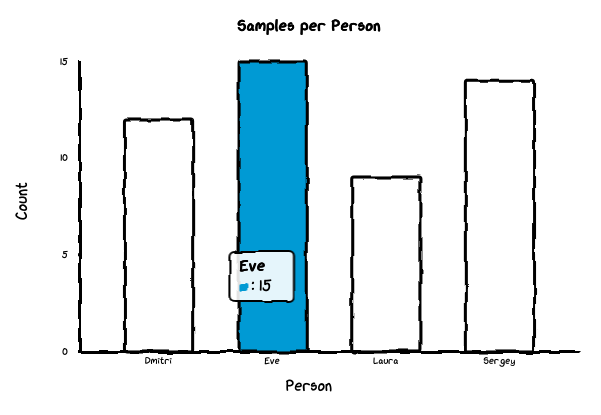
Bar chart.

Bar

Bases: _AxisChart

Bar chart with categorical x-axis.

By default renders only datasets[0]. Set grouped=True in options to render all datasets as side-by-side bars within each category.

Parameters:

Name Type Description Default
title str | None

Chart title.

None
x_label str | None

Label for the x-axis.

None
y_label str | None

Label for the y-axis.

None
labels Any

Category names for the x-axis.

required
datasets Any

List of dataset dicts, each with a data key (list of numeric values) and an optional label key. Only the first dataset is used unless grouped=True.

required
options Any

Dict of chart options.

None

Options:

  • backgroundColor (str): Background color (default 'white').
  • dataColors (list[str]): Bar colors.
  • fontFamily (str): Font family (default 'xkcd').
  • grouped (bool): Render all datasets as grouped side-by-side bars (default False).
  • strokeColor (str): Axis/border color (default 'black').
  • unxkcdify (bool): Disable hand-drawn style (default False).
  • yMin (float): Minimum y-axis value (default 0).
  • yMax (float): Maximum y-axis value (default data max).
  • yTickCount (int): Number of y-axis ticks (default 3).

Example — simple bar::

Bar(
    title="Monthly Sales",
    x_label="Month",
    y_label="Revenue",
    labels=["Jan", "Feb", "Mar"],
    datasets=[{"data": [10, 20, 30]}],
)

Example — grouped bar::

Bar(
    title="Quarterly Sales",
    x_label="Quarter",
    y_label="Units",
    labels=["Q1", "Q2", "Q3"],
    datasets=[
        {"data": [10, 20, 30], "label": "Widgets"},
        {"data": [5, 15, 10], "label": "Gadgets"},
    ],
    options={"grouped": True},
)
Source code in src/chart_xkcd/bar.py
 7
 8
 9
10
11
12
13
14
15
16
17
18
19
20
21
22
23
24
25
26
27
28
29
30
31
32
33
34
35
36
37
38
39
40
41
42
43
44
45
46
47
48
49
50
51
52
53
54
55
56
57
58
59
60
61
62
63
64
65
66
67
68
69
70
71
72
73
74
75
class Bar(_AxisChart):
    """Bar chart with categorical x-axis.

    By default renders only ``datasets[0]``. Set ``grouped=True`` in options
    to render all datasets as side-by-side bars within each category.

    Args:
        title: Chart title.
        x_label: Label for the x-axis.
        y_label: Label for the y-axis.
        labels: Category names for the x-axis.
        datasets: List of dataset dicts, each with a ``data`` key
            (list of numeric values) and an optional ``label`` key.
            Only the first dataset is used unless ``grouped=True``.
        options: Dict of chart options.

    Options:

    - ``backgroundColor`` (str): Background color (default ``'white'``).
    - ``dataColors`` (list[str]): Bar colors.
    - ``fontFamily`` (str): Font family (default ``'xkcd'``).
    - ``grouped`` (bool): Render all datasets as grouped side-by-side bars
      (default False).
    - ``strokeColor`` (str): Axis/border color (default ``'black'``).
    - ``unxkcdify`` (bool): Disable hand-drawn style (default False).
    - ``yMin`` (float): Minimum y-axis value (default 0).
    - ``yMax`` (float): Maximum y-axis value (default data max).
    - ``yTickCount`` (int): Number of y-axis ticks (default 3).

    Example — simple bar::

        Bar(
            title="Monthly Sales",
            x_label="Month",
            y_label="Revenue",
            labels=["Jan", "Feb", "Mar"],
            datasets=[{"data": [10, 20, 30]}],
        )

    Example — grouped bar::

        Bar(
            title="Quarterly Sales",
            x_label="Quarter",
            y_label="Units",
            labels=["Q1", "Q2", "Q3"],
            datasets=[
                {"data": [10, 20, 30], "label": "Widgets"},
                {"data": [5, 15, 10], "label": "Gadgets"},
            ],
            options={"grouped": True},
        )
    """

    def __init__(
        self,
        *,
        title: str | None = None,
        x_label: str | None = None,
        y_label: str | None = None,
        labels: Any,
        datasets: Any,
        options: Any = None,
    ):
        _check_labels_datasets(labels, datasets, "Bar")
        data = {"labels": list(labels), "datasets": list(datasets)}
        super().__init__(
            title=title, x_label=x_label, y_label=y_label, data=data, options=options
        )

example